I Got Tired of Seating Charts, So I Built a Fix
Feb. 21, 2026 | Categories: Swift codingTake Your Seat
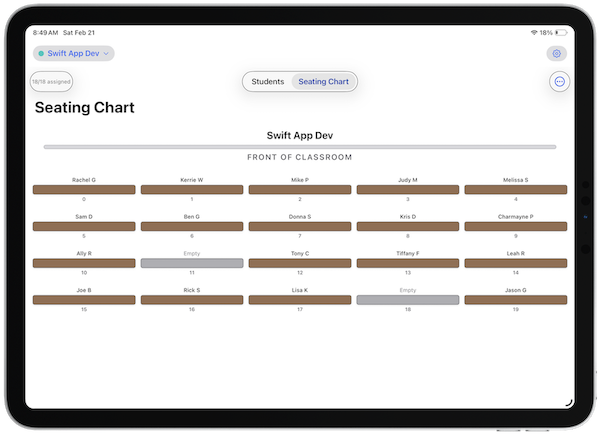
If you've been teaching for any length of time, you know the drill. New
semester, new seating chart. You stare at your roster, stare at your desks,
and start scribbling names into boxes — only to realize you need to redo the
whole thing because you put two students next to each other who should be on
opposite sides of the building.
Then there's the sub folder. You need a clean, printed class list and a
seating chart that an unfamiliar adult can actually make sense of. So you open
a spreadsheet, or Keynote, or PowerPoint, or Slides, or a drawing app, or maybe you just grab a pen and a blank
sheet of paper. It works, but it's not exactly fast.
I got tired of the process, so I built an app to fix it.
From My Classroom to the App Store
Take Your Seat started as a tool I built for myself. I wanted two things: a quick way
to generate random seating assignments and an easy way to print class lists
and seating charts for my sub folder. That was it. Nothing fancy — just
something that removed the friction from a task I had to do multiple times a
year.
Then a colleague saw it on my iPad, asked if they could download it, and I
realized it might be useful beyond my own classroom. So I cleaned it up and
put it in the App Store.
What It Does
Take Your Seat is focused and straightforward. Here's what you get:
Randomize seating in one tap. Hit the randomize button and every student gets
a new seat instantly. No index cards to shuffle, no spreadsheet formulas to
fuss with.
Create multiple classes, each with its own layout. Whether you have a room
with 6 rows of 5 or a small seminar with 3 rows of 4, you can configure each
class independently with custom rows and columns. Color-code them for quick
identification.
Drag and drop to fine-tune. Random assignments are a great starting point, but
sometimes you need to make adjustments. Drag a student from the unassigned
list to a desk, or swap two students by dragging one onto the other.
Export to PDF. Need a printed class list or seating chart for your sub folder?
Export either one as a PDF and share it however you like — print it, email
it, or drop it into your files.
Give It a Try
If you're looking to save yourself some time on one of those important but
mundane classroom tasks, I'd encourage you to check out TAKE YOUR SEAT. It's the kind of
tool that does one job and does it well — so you can spend your time on the
parts of teaching that actually matter.