School Notes: A Note-Taking App Built by a Teacher, for Teachers and Students
March 23, 2026 | Categories: classroom Swift coding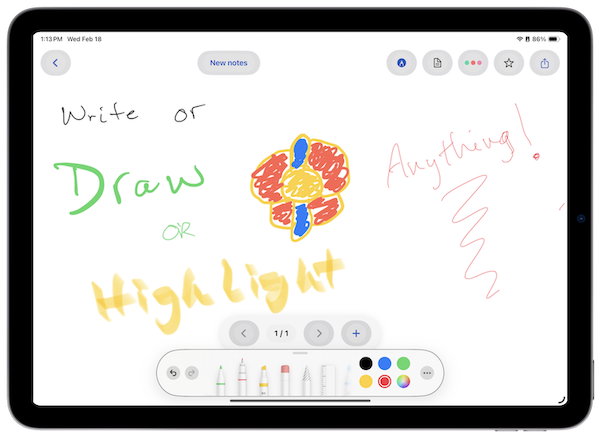
I’m thrilled to share that — SchoolNotes, an iPad app I’ve been building for my school district, has officially been approved by Apple and is now available on the App Store!
As a computer science teacher and systems administrator at the Trumbull Career and Technical Center, I spend a lot of time thinking about how technology can make life easier for educators and students. I see firsthand how important it is to have the right tools — tools that are intuitive, reliable, and don’t lock you into a complicated ecosystem. That’s exactly what motivated me to build SchoolNotes.
Why I Built It
Educators and students already have enough to juggle. The last thing anyone needs is a note-taking app that stores files in some obscure proprietary format that’s hard to share, export, or open somewhere else. I wanted something better — an app that keeps your work in a universally accessible format: PDF.
Whether you’re annotating a worksheet, sketching a diagram, or jotting down notes during a lesson, everything in SchoolNotes is stored as a standard PDF. That means no vendor lock-in, no compatibility headaches, and no worrying about whether your notes will open on a different device or app down the road.
What SchoolNotes Can Do
SchoolNotes is designed around the tools students and teachers actually use every day on iPad:
✏️ Handwritten Notes with Apple PencilKit
Take handwritten notes or draw diagrams using Apple’s built-in PencilKit tools — the same powerful drawing engine that powers many of Apple’s own apps. Supports multi-page notes so you can keep an entire lesson or project together in one place.
📄 PDF Import and Annotation
Import PDFs directly from other apps using the Share Extension, then annotate them by hand right on the page. Great for marking up handouts, worksheets, or any document shared with you.
⌨️ Text Notes
Prefer typing? SchoolNotes includes a text editor mode for when you want to quickly capture information the old-fashioned way.
📂 Organized by Class
Keep notes sorted by class or subject, so your work stays organized throughout the school year. Notes can be viewed in a list or a grid layout, whichever you prefer.
☁️ iCloud Sync with Managed Apple Accounts
This one is especially important in a school setting. SchoolNotes is built with iCloud sync in mind, and it’s been optimized to work smoothly with the Managed Apple Accounts that many school districts — including ours — use to manage student and staff devices. Notes sync seamlessly across a student’s or teacher’s devices without any extra setup.
Built for CTE, Useful for Everyone
I built SchoolNotes with the students and colleagues at Trumbull Career and Technical Center in mind. CTE programs are hands-on by nature, and students are constantly moving between theory and practice. Having a single, organized place for notes — whether that’s a diagram of a circuit, annotated safety procedures, or class discussion notes — makes a real difference.
That said, SchoolNotes is simple enough to be useful in any classroom setting. If you’re an educator or student with an iPad and an Apple Pencil, it’s designed for you.
Get SchoolNotes
SchoolNotes is free and available now on the App Store. I’d love for you to give it a try and let me know what you think!
👉 Download SchoolNotes on the App Store
If you have feedback, ideas, or questions — especially if you’re an educator thinking about using it in your classroom — don’t hesitate to reach out. This app was built for our school community, and I want it to keep getting better.
SchoolNotes is available for iPad on iOS 17 and later. iCloud sync requires an iCloud account.